

游戏地图制作开发入门二
本篇将接上一篇文章——游戏地图制作开发入门一,不清楚的可以先阅读前一篇文章,以方便学习。这次我主要是讲解如何将之前编辑的地图加入到代码中并显示地图出来,
代码是结合cocos2dx引擎实现,cocos2dx引擎由于开源,并且实现跨平台,导致越来越多的开发者学习使用,引擎是c++实现,这点肯定吸引了很多c++程序员,我也不例外。
如果想了解此引擎可以到引擎官网去学习一下。好,也不多说了,开始说正题吧。
1.利用vs向导生成一个cocos2dx程序,关于如何配置cocos2dx向导程序到vs中,网上有很多,也不想多说。
2.将上一篇讲解的地图文件0.tmx和地图块文件terrain.png复制到创建的程序Resource目录。
3.修改HelloWorldScene.cpp中的init方法代码,这里之前是创建hello world的代码。
// on "init" you need to initialize your instance
bool HelloWorld::init()
{
    bool bRet = false;
    do
    {
        //////////////////////////////////////////////////////////////////////////
        // super init first
        //////////////////////////////////////////////////////////////////////////

        CC_BREAK_IF(! CCLayer::init());

        //////////////////////////////////////////////////////////////////////////
        // add your codes below...
        //////////////////////////////////////////////////////////////////////////

        // 1. Add a menu item with "X" image, which is clicked to quit the program.

        // Create a "close" menu item with close icon, it's an auto release object.
        //CCMenuItemImage *pCloseItem = CCMenuItemImage::create(
        //    "CloseNormal.png",
        //    "CloseSelected.png",
        //    this,
        //    menu_selector(HelloWorld::menuCloseCallback));
        //CC_BREAK_IF(! pCloseItem);

        //// Place the menu item bottom-right conner.
        //pCloseItem->setPosition(ccp(CCDirector::sharedDirector()->getWinSize().width - 20, 20));

        //// Create a menu with the "close" menu item, it's an auto release object.
        //CCMenu* pMenu = CCMenu::create(pCloseItem, NULL);
        //pMenu->setPosition(CCPointZero);
        //CC_BREAK_IF(! pMenu);

        //// Add the menu to HelloWorld layer as a child layer.
        //this->addChild(pMenu, 1);

        //// 2. Add a label shows "Hello World".

        //// Create a label and initialize with string "Hello World".
        //CCLabelTTF* pLabel = CCLabelTTF::create("Hello World", "Arial", 24);
        //CC_BREAK_IF(! pLabel);

        //// Get window size and place the label upper.
        //CCSize size = CCDirector::sharedDirector()->getWinSize();
        //pLabel->setPosition(ccp(size.width / 2, size.height - 50));

        //// Add the label to HelloWorld layer as a child layer.
        //this->addChild(pLabel, 1);

        //// 3. Add add a splash screen, show the cocos2d splash image.
        //CCSprite* pSprite = CCSprite::create("HelloWorld.png");
        //CC_BREAK_IF(! pSprite);

        //// Place the sprite on the center of the screen
        //pSprite->setPosition(ccp(size.width/2, size.height/2));

        //// Add the sprite to HelloWorld layer as a child layer.
        //this->addChild(pSprite, 0);

        CCTMXTiledMap *pMap = CCTMXTiledMap::create("0.tmx");
        pMap->setPosition(ccp(0,0));
        this->addChild(pMap,3);

        CCArray* array = pMap->getChildren();
        CCObject* object = NULL;
        CCSpriteBatchNode* child = NULL;
        CCARRAY_FOREACH(array, object)
        {
            child = (CCSpriteBatchNode*)object;
            child->getTexture()->setAntiAliasTexParameters();
        }//设置抗锯齿,如果需要对地图进行放大或缩小时,就可以使用

        bRet = true;
    } while (0);

    return bRet;
}
4.编译运行如下:
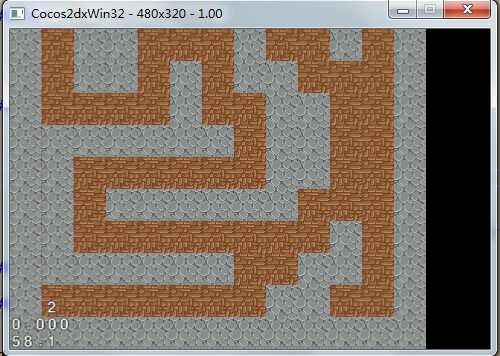
5.我们看效果注意一个问题,发现程序右边多出黑色,上面被切断了部分,这并不是我们要的效果,这是由于我们之前创建地图时设置的是13*13地图块大小,一个地图块是32*32px,但代码中创建程序窗口还是默认大小480*320,其实我们程序应该是13*32 = 416,也就是416*416,那我们修改下是否可以达到效果。
修改main.cpp文件的窗口大小代码:
// create the application instance
   AppDelegate app;
   CCEGLView* eglView = CCEGLView::sharedOpenGLView();
   eglView->setFrameSize(416, 416);
6.最后编译运行效果:

是我们期望的效果。
这篇结束后期再写。